Forecloud Technologies Pvt. Ltd. - How to Open the Same List in a New Tab When Switching Companies in Business Central
Introduction:
The company switcher in Microsoft Dynamics 365 Business Central offers an efficient and versatile method for navigating between different organizational entities. Accessible directly from any page, the company switcher pane provides a comprehensive overview of all companies across your accessible environments. This feature empowers users to transition seamlessly to a different company, offering the flexibility to remain in the current browser tab or launch a new one to maintain their existing workspace.
Pre-requisites:
- Business Central Environment
Step-by-Step Guide
To navigate between companies and utilize the tab functionalities, follow these steps:
- Access the Pane: Open the Available Companies pane from your current page in Business Central.
- Select the Company: Locate and select the specific company you wish to switch to.
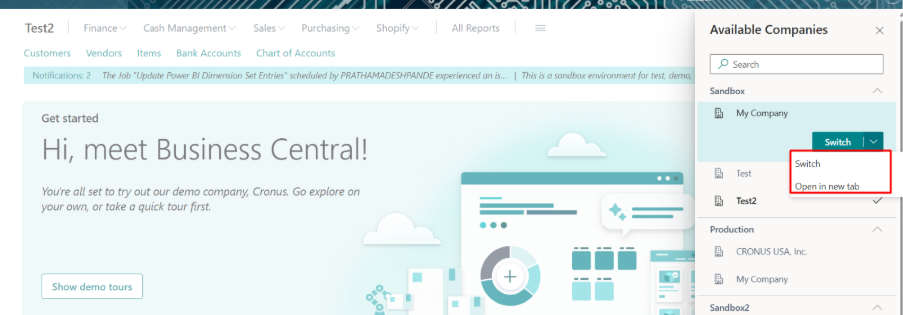
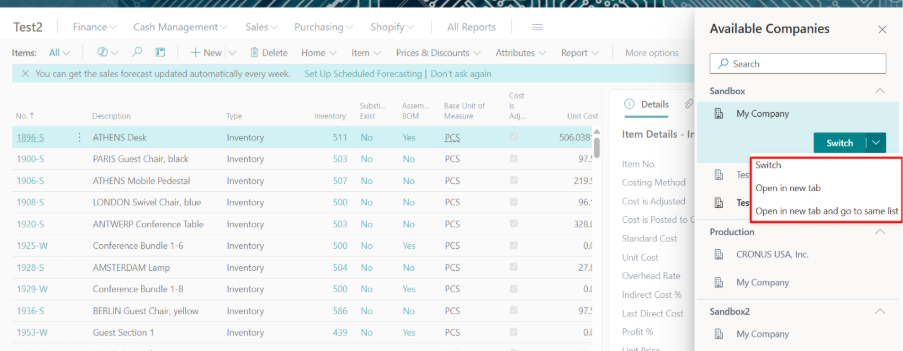
- Choose a Switch Option: Click the Switch arrow, then select one of the corresponding options detailed below:
| Option | Description |
| Switch | Opens the role center for selected company in the same browser tab that you're working in. The company becomes the default company that opens in Business Central, until you switch again or change the company by using My Settings. |
| Open in new tab | Opens the role center for selected company in a new browser tab, keeping the original company open in the other tab. |
| Open in new tab and go to same page | This option is only active on list pages, like customers, sales orders, or items. It opens the same list, but for the selected company, in a new browser tab. |
Note: Please note that the ‘Open in new tab and go to same page’ option is only available when you are on a list page.
Conclusion:
Leveraging the advanced options within the Business Central company switcher allows users to multitask more effectively across multiple entities. By opening corresponding list pages in separate tabs, professionals can streamline data comparison and significantly enhance their overall workflow and productivity within the system.
Prathama Deshpande
Prathama Deshpande is Business Central Consultant working with Forecloud Technologies. She is one of the key responsible person for Business Central Customization Development, Functional Implementation and Support.
No comments yet. Login to start a new discussion Start a new discussion