Forecloud Technologies Pvt. Ltd. - Specify posting periods-BCv28
Posting date restrictions are commonly used in Microsoft Dynamics 365 Business Central to control the periods in which users can create financial transactions. Traditionally, administrators configure
Introduction:
Posting date restrictions are commonly used in Microsoft Dynamics 365 Business Central to control the periods in which users can create financial transactions. Traditionally, administrators configure fixed "Allow Posting From" and "Allow Posting To" dates, which require regular updates as accounting periods change.
To reduce maintenance and improve flexibility, Business Central supports Date Formulas for posting period management. These formulas automatically calculate posting boundaries relative to the current Work Date, ensuring posting permissions remain up to date without manual intervention.
This blog explains how dynamic posting periods work, where they can be configured, and how to implement common scenarios using Date Formulas.
Use posting periods to specify when users can post to the general ledger.
Pre-requisites:
- Business Central Environment
Dynamically Calculate Posting Periods
Business Central allows you to use Date Formulas to define the range of allowed posting dates. Instead of entering fixed dates that require periodic updates, you can enter formulas that calculate posting boundaries based on the current Work Date.
Date Formula Fields Available In
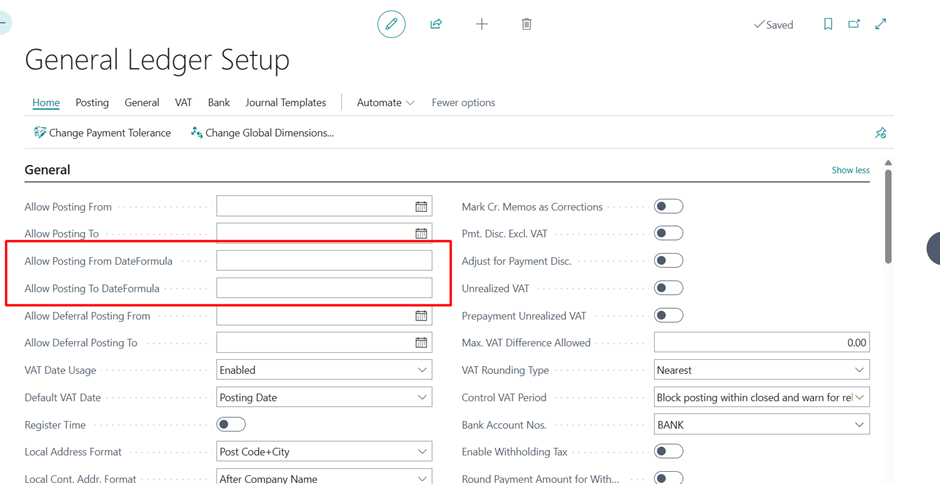
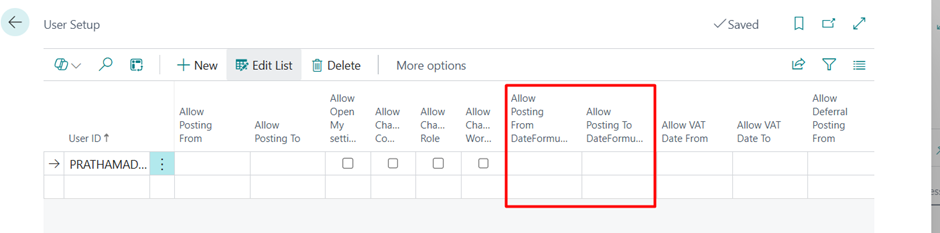
The following pages include the Allow Posting From Date Formula and Allow Posting To Date Formula fields:
- General Ledger Setup
- (Choose "Show More" if the fields are not visible.)
- User Setup
- General Journal Templates
Using Date Formulas with Fixed Dates
For each posting boundary (From or To), you can use either:
- A fixed date, or
- A date formula
Important Behaviour
- When you enter a Date Formula, the corresponding fixed date field is automatically cleared.
- When you enter a Fixed Date, the corresponding formula field is automatically cleared.
- You can combine methods by using:
- A fixed date for one boundary.
- A date formula for the other boundary.
This flexibility allows organizations to create posting policies that best fit their accounting processes.
Common Posting Period Scenarios
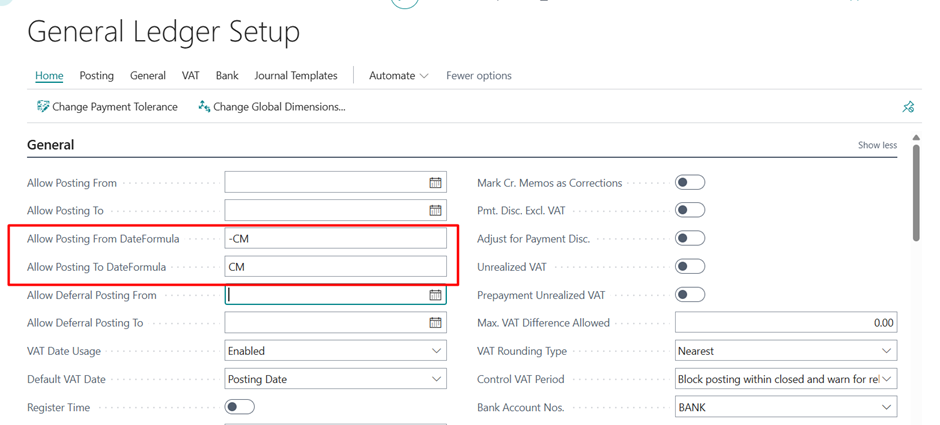
Scenario 1: Allow Posting for the Current Month Only
To restrict users to posting only within the current month:
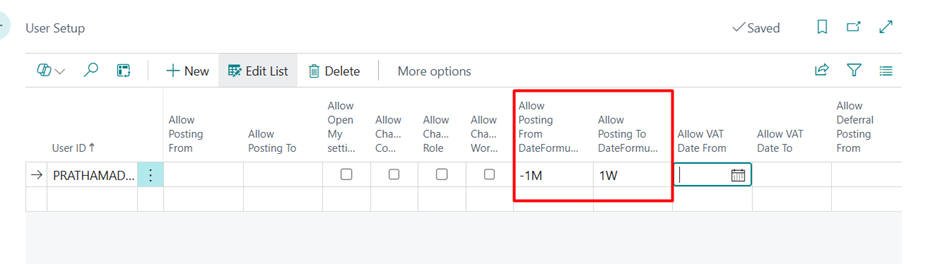
Scenario 2: Allow Posting One Month Back and One Week Forward
To allow postings from the previous month through one week after the current Work
Benefits of Using Dynamic Posting Periods
- Eliminates recurring maintenance of posting dates.
- Automatically adjusts posting windows based on the Work Date.
- Reduces the risk of incorrect postings.
- Supports flexible accounting and operational requirements.
- Simplifies period-end administration.
Conclusion
Date Formula-based posting periods in Business Central v28 provide a powerful and flexible alternative to manually maintained posting date ranges. By configuring dynamic posting boundaries in General Ledger Setup, User Setup, or General Journal Templates, organizations can automate posting period management, reduce administrative effort, and maintain stronger financial controls.
Whether you need to restrict postings to the current month or allow controlled historical and future postings, Date Formulas offer an efficient and scalable solution.
Prathama Deshpande
Prathama Deshpande is Business Central Consultant working with Forecloud Technologies. She is one of the key responsible person for Business Central Customization Development, Functional Implementation and Support.
No comments yet. Login to start a new discussion Start a new discussion