Forecloud Technologies Pvt. Ltd. - Business Central 2025 release wave 1(BC v26) - Extend CardPageId on list and listpart pages
In this blog post, we will guide you through the process of extending CardPageId on list and listpart pages in Business Central environment, the new features introduced in Release Wave 1 (BC v26).
Business Central 2025 release wave 1(BC v26) - Extend CardPageId on list and listpart pages
Introduction:
In this blog post, we will guide you through the process of extending CardPageId on list and listpart pages in Business Central environment, the new features introduced in Release Wave 1 (BC v26).
Pre-requisites:
- Business Central Environment
2.Reference Documentation: https://learn.microsoft.com/en-us/dynamics365/release-plan/2025wave1/smb/dynamics365-business-central/extend-cardpageid-list-listpart-pages
Feature:
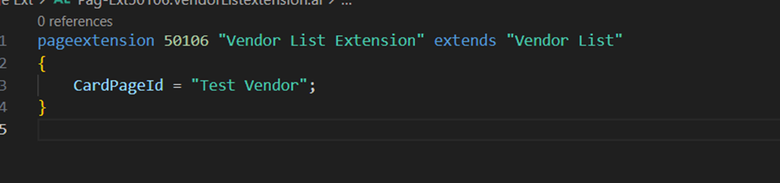
-With BC v26, Microsoft has introduced a significant enhancement: modifying the CardPageId property directly through a PageExtension. This allows you to customize which card page appears when a user double-clicks an item from a list or listpart page.
-The CardPageId property is now extendable, so you can specify a different card page for the list or listpart pages. This is helpful if you want to use custom card pages for business data, improving the user experience.
-If the CardPageId is already set on the base page, the value you set in the PageExtension will override it. This ensures you have full control over the card page display, even if other extensions or customizations are already in place.
-If multiple PageExtensions modify the property, the last extension to be applied will take effect. As per-tenant extensions are applied after AppSource apps, this implies that any race condition across multiple AppSource apps setting the same CardPageId can be resolved in a per-tenant extension if needed, although this will seldomly happen.
Solution:
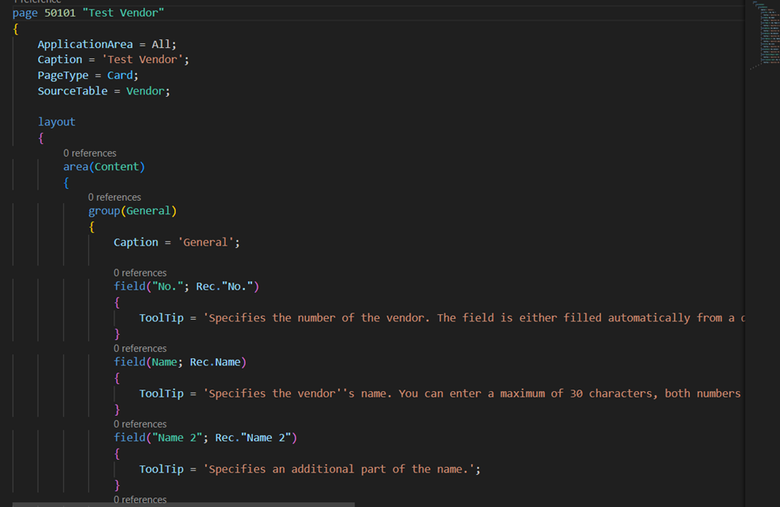
1. Create a New Card Page for a Vendor
In our example, created a custom card page for the Vendor table (TableId: 23)
2. Add the CardPageId Property in the Page Extension
Next, extend the Vendor List Page to specify which card page should be opened when a user double-clicks a vendor record. To do this, create a PageExtension for the Vendor List Page.
Result:
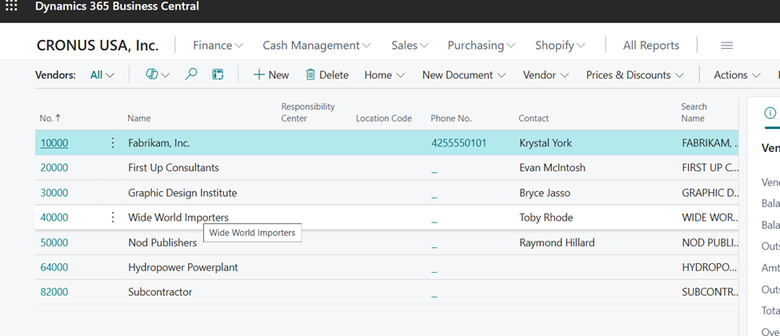
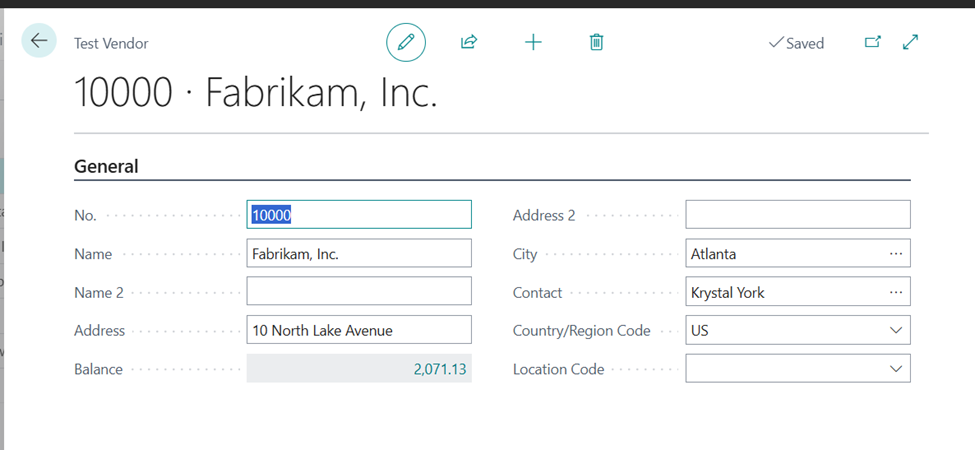
when we open the vendor form vendor list, it will open a page with a new vendor card page.
Conclusion:
By following the steps outlined above, you can quickly set up this functionality in your own Business Central environment and start enhancing your application’s user experience.
The ability to extend the CardPageId on list and listpart pages in Business Central 2025 Release Wave 1 (BC v26) opens up new development for customization.
Prathama Deshpande
Prathama Deshpande is Business Central Consultant working with Forecloud Technologies. She is one of the key responsible person for Business Central Customization Development, Functional Implementation and Support.
No comments yet. Login to start a new discussion Start a new discussion