Forecloud Technologies Pvt. Ltd. - Analyse Records by Field in Business Central (Wave 28)
With the latest Release Wave 28 update in Microsoft Dynamics 365 Business Central, users can now easily track who created or modified records directly from the document pages. This enhancement improve
Introduction:
With the latest Release Wave 28 update in Microsoft Dynamics 365 Business Central, users can now easily track who created or modified records directly from the document pages. This enhancement improves transparency and helps users quickly identify changes made to business documents.
Pre-requisites:
- Business Central Environment
Steps to View Created/Modified By Information
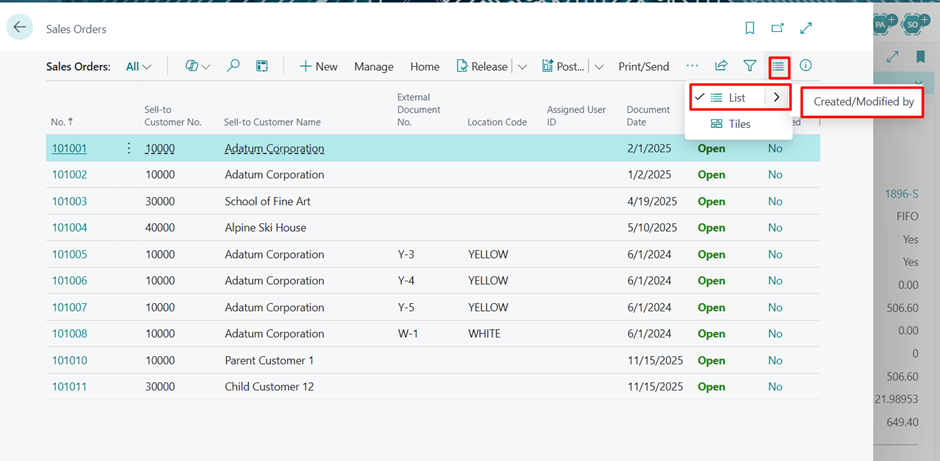
Step 1: Open the Sales Order List Page
Navigate to:
Sales Orders → List → Created/Modified By
From the Sales Order List page, you can now view details about the user who created or last modified the document.
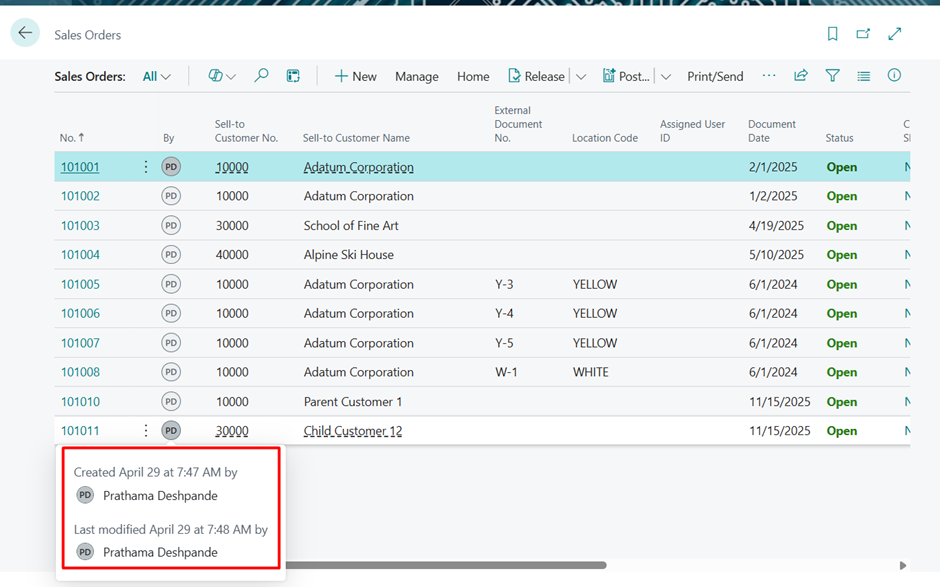
Step 2: Hover Over the User ID
Hover your cursor over the displayed User ID.
A tooltip will appear showing:
- Created By
- Created Date & Time
- Modified By
- Modified Date & Time
This feature makes it easier to analyze document history without opening additional pages or audit logs.
Conclusion:
The new “Created/Modified By” functionality introduced in Release Wave 28 enhances record traceability in Microsoft Dynamics 365 Business Central. Users can now efficiently analyze document changes and monitor user activities directly from list pages, making day-to-day operations more transparent and manageable.
Prathama Deshpande
Prathama Deshpande is Business Central Consultant working with Forecloud Technologies. She is one of the key responsible person for Business Central Customization Development, Functional Implementation and Support.
No comments yet. Login to start a new discussion Start a new discussion